



Let GPT Build Your Own Real-Time Monitoring Dashboard
Many energy enthusiasts, solar PV users, home automation hobbyists, and IoT developers dream of building their own real-time monitoring dashboard.
But once you think about the details—HTML, JavaScript, MQTT parsing, chart rendering, UI layout… Most people give up.
Today, this whole process becomes extremely simple:
You provide your IAMMETER MQTT credentials, and GPT will generate the entire dashboard automatically.
But here is a very important clarification:
Not All GPT Models Can Generate the Correct Code
Only IAMMETER Assistant Can Do It Reliably
General GPT models often produce:
- Wrong API endpoints
- Incorrect MQTT payload formats
- Non-existent fields
- Unusable JavaScript
- Conflicting code logic
- Code that simply won’t run
IAMMETER Assistant, however, is trained specifically on:
- IAMMETER API
- IAMMETER MQTT protocol & payload
- Typical IAMMETER data structures
- Real-world working examples
- Best practices for IoT dashboards
This allows it to generate:
✔ Working code ✔ Clean front-end logic ✔ Correct MQTT subscription handlers ✔ Data models that match real IAMMETER devices ✔ Dashboards that run instantly ✔ Continuous improvements on demand
👉 Try IAMMETER Assistant here: https://chatgpt.com/g/g-68e9cc3b83408191901b66b524ba5373-iammeter-assistant
Start With a Fully Generated Demo: iammeterJS
(Yes—This Entire Project Was Generated Directly by IAMMETER Assistant)
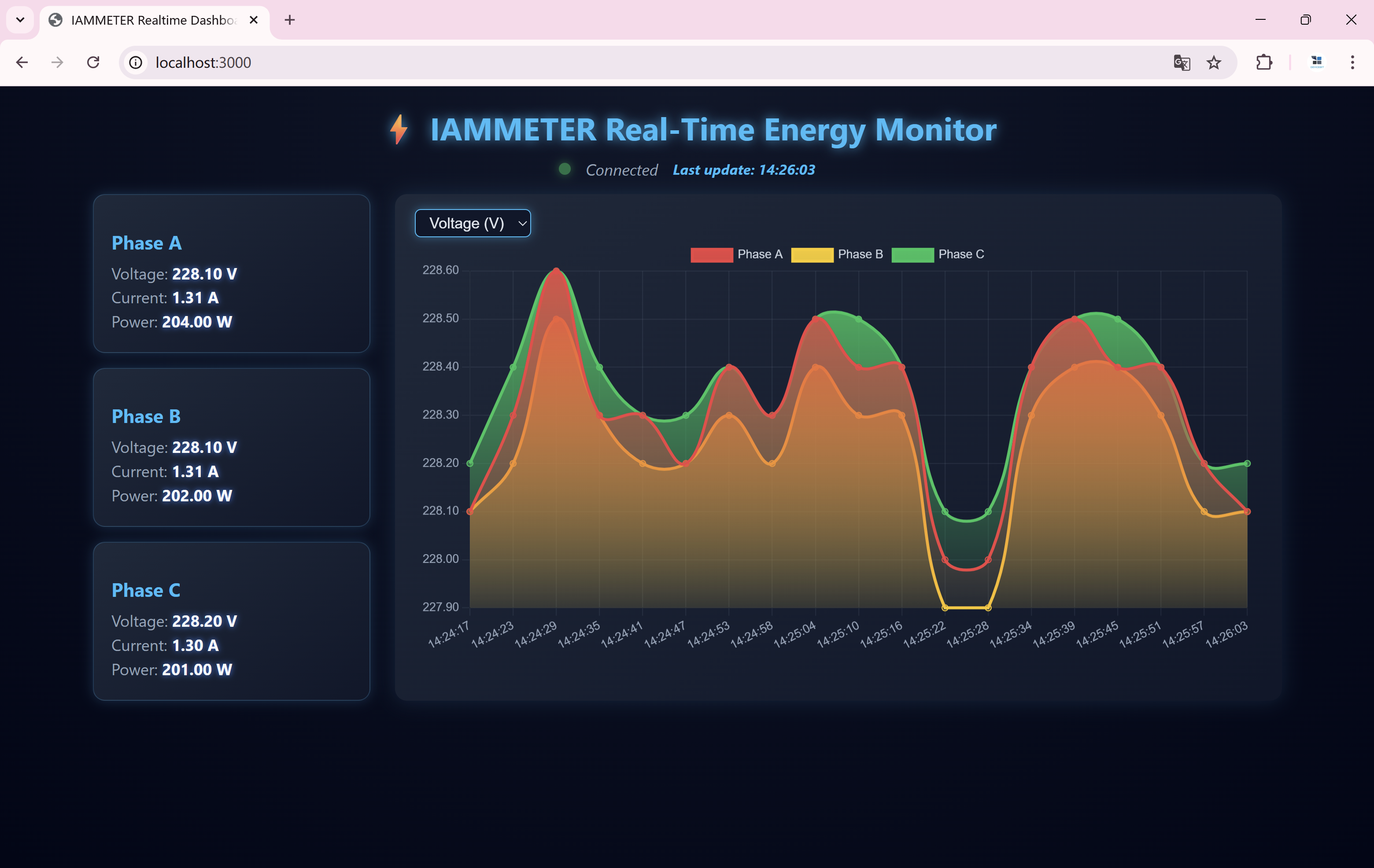
Before creating your own dashboard, you can warm up by running a complete working demo:
👉 GitHub: iammeterJS https://github.com/lewei50/iammeterJS
This repository is ideal for beginners because:
- Every line of code was generated by IAMMETER Assistant
- Backend + frontend + MQTT logic included
- You can run it immediately (
npm install→node mqtt-iammeter.js) - Easy to understand and extend
- A perfect preview of what “AI-generated dashboards” look like
Try this first and you’ll immediately feel how easy the workflow becomes.
Build Your Own Real-Time Monitoring Dashboard
Using IAMMETER MQTT + GPT-Generated Code
1. Install Node.js
Download the latest LTS version: https://nodejs.org/
2. Download the project and configure config.json
Modify these three fields:
mqtt_user
mqtt_pass
device_sn
See the setup guide here: https://www.iammeter.com/blog/subscribe-real-time-energy-data-mqtt#iammeter-mqtt-broker-configuration
3. Install dependencies
npm install
4. Start the service
node mqtt-iammeter.js
Open:
http://localhost:3000
You will see your real-time monitoring dashboard running with live IAMMETER MQTT data.
Important: Make Sure Your IAMMETER Meter Is in MQTT Mode
Enable MQTT mode according to this guide: https://www.iammeter.com/blog/subscribe-real-time-energy-data-mqtt#configure-iammeter-meter-to-use-mqtt-mode
Suggested testing setting: Upload interval = 6 seconds
The Fun Part: Let IAMMETER Assistant Continue Developing the Dashboard
Once the dashboard runs successfully, the real magic begins.
You can paste your HTML/JS code into IAMMETER Assistant and request any enhancement:
- “Make the UI more modern.”
- “Add a monthly energy consumption card.”
- “Support multiple meters (multi-device).”
- “Add smooth curves instead of sharp lines.”
- “Add dark mode.”
- “Optimize for mobile devices.”
- “Add CSV export.”
- “Create a comparison chart between phases.”
The assistant will:
✔ Understand your existing code ✔ Follow IAMMETER protocol precisely ✔ Rewrite or expand your dashboard ✔ Produce fully working updated code
It’s like having your own AI software engineer for IAMMETER development.
Why Other GPT Models Cannot Do This
General GPT models simply don’t know:
- IAMMETER payload structures
- IAMMETER field meanings
- IAMMETER MQTT topics
- IAMMETER API response formats
- Energy monitoring logic
This leads to hallucinated fields, wrong structures, and broken code.
IAMMETER Assistant is trained specifically for:
- Household solar monitoring
- IAMMETER energy meters
- IoT dashboards
- Real-time MQTT processing
- Visualization of electric parameters
That is why it consistently generates correct, runnable, expandable code.
Final Thoughts:
The Future of Dashboard Development Is “Talk-Driven”, Not “Code-Driven”
Traditionally, building a monitoring dashboard required:
- MQTT clients
- WebSocket handlers
- JSON parsing
- Frontend UI
- Chart libraries
- CSS layouts
Now it only requires one sentence:
“IAMMETER Assistant, please generate a real-time dashboard for my IAMMETER MQTT data.”
Then run it. Not satisfied? Tell it what to change. It rewrites the code.
Your dashboard evolves simply by talking to it.